Pages

Showing posts with label more. Show all posts

Thursday, April 28, 2016

HTC One M8 gallery and more details!


The HTC One (M8) launch event is over, yet we still are very excited! It seems that HTC did it again – right from this place I’m telling you – this will be the best smartphone of the 2014!

Here are some official pictures:


As you can see HTC One (M8) comes in a 3 colours - Gunmetal Grey, Amber Gold and Glacial Silver. Personally I love the first one - Gunmetal Grey. It looks gorgeous!

Here are the highlights that stand out the most:
  • A more refined design: its 90% metal now, with the metal wrapping up the side (the HTC One was 70% metal). The gunmetal grey is simply gorgeous and has this great texture to it. The entire phone is more solidly constructed.
  • Bigger Battery: with a 2600 mAH battery, it lasts longer.
  • Bigger Storage: Yes, its true, there is a microSD slot in there, and it supports up to 128 GB of storage. Hows that for mind-blowing?
  • Bigger Screen: 5 inches is a nice size; not so huge like the One Max, but noticeably bigger than the 4.7 inch screen on the HTC One.
  • Better BoomSound: The audio quality from the dual-front facing speakers on the HTC One was great...but you wouldnt believe how much better the new HTC One (M8) sounds! Richer, fuller audio with a wider sound. Its 25% louder, yes, but the audio quality is dramatically better.
  • A Better Camera Experience: Its a 4 megapixel UltraPixel sensor, but we switched to a new provider for the sensor, completely addressed the pink tint issue, added a second sensor to get depth/spatial information (which allows for some great camera effects). Image quality is simply better.
And here is the official full specification:
  • COLORS: Gunmetal Gray, Glacial Silver, Amber Gold
  • DISPLAY: 5.0 inch, Full HD 1080p Corning® Gorilla® Glass 3
  • CPU SPEED: Qualcomm Snapdragon 801 processor / 2.5GHz quad-core CPU in Asia/China / 2.3GHz quad-core CPU in US/EMEA
  • PLATFORM ANDROID: Android™ 4.4 with HTC Sense 6, HTC BlinkFeed?
  • SIM CARD TYPE: nanoSIM
  • CAMERA: Duo camera. Primary Camera: HTC UltraPixel camera , BSI sensor
  • 2.0 um, sensor size 1/3”, ƒ/2.0, 28mm lens. HTC ImageChip 2. 1080p Full HD video recording with HDR video. Secondary camera: capture depth information. Front Camera: 5MP, ƒ/2.0, BSI sensor, wide angle lens with HDR capability, 1080p Full HD video recording Gallery with UFocus, Dimension Plus, Seasons, Foregrounder, Image match.
  • MEMORY: Total storage: 16GB/32GB, available capacity varies. Expansion card slot supports microSD™ memory card for up to 128GB additional storage 
  • RAM: 2 GB DDR3
  • ?BATTERY: Embedded rechargeable Li-polymer battery. Capacity: 2600 mAh
  • Talk time: Up to 20 hours for 3G
  • Standby time: Up to 496 hours for 3G
  • Voltage range/frequency: 100 ~ 240 V AC, 50/60 Hz
  • DC output: 5V and 1.5 A
  • GPS: Internal GPS antenna + GLONASS, Digital compass
  • SENSORS: Gyro sensor, Accelerometer, Proximity sensor, Ambient light sensor, Barometer
  • CONNECTIVITY(3): 3.5 mm stereo audio jack, NFC (3), Bluetooth® 4.0 with aptX™ enabled
  • Wi-Fi®: IEEE 802.11 a/b/g/n/ac (2.4 & 5 GHz) DLNA®, HTC Connect
  • Micro-USB 2.0 (5-pin) port with mobile high-definition video link (MHL) for USB or HDMI connection
  • SOUND ENHANCEMENT: HTC BoomSound, Dual front-facing stereo speakers with built-in amplifiers, HTC Sense Voice
  • Dimensions (LxWxT): 146.36 x 70.6 x 9.35 mm
  • Weight: 160g
NETWORK COVERAGE:
  • 2G/ 2.5G - GSM/GPRS/EDGE: 850/900/1800/1900 MHz
  • 3G - WCDMA:
  • EMEA: 850/900/1900/2100 MHz with HSPA+ up to 42 Mbps
  • Asia: 850/900/1900/2100 MHz with HSPA+ up to 42 Mbps
  • AT&T: 850/1900/2100 MHz with HSPA+ up to 21 Mbps
  • Sprint: 850/1900/2100 MHz with HSPA up to 14.4 Mbps
  • Verizon: 850/900/1900/2100 MHz with HSPA+ up to 14.4 Mbps
  • Tmus: 850/AWS/1900/2100 MHz with HSPA+ up to 42 Mbps
  • 3G - CDMA
  • Sprint & Verizon: 800/1900 MHz4G - LTE:
  • EMEA: 800/900/1800/2600 MHz
  • Asia: 700/900/1800/2100/2600 MHz
  • AT&T: 700/850/AWS/1800/1900/2600 MHz
  • Sprint: FDD 800/1900 MHz , TDD 2600 MHz
  • Verizon: 700/AWS/1800/2600 MHz
  • T-Mobile: 700/AWS MHz
Have any questions or comments? Feel free to share! Also, if you like this article, please use media sharing buttons (Twitter, G+, Facebook) below this post!

For latest news follow Android Revolution HD on popular social platforms:

Read More..

Wednesday, April 27, 2016

HTC One Android 4 2 2 with HTC Sense 5 1 aka HTC Sense 5 0


There were quite a lot of rumours about upcoming HTC Sense and Android 4.2.2 update for HTC One and HTC Butterfly. All were expecting HTC Sense 5.1 to show up, but instead, the version of HTC UI in latest Android 4.2.2 update is still 5.0. However, it does have a lot of important changes. Let me introduce few of them.
1. % battery icon


Finally! The most popular modification in custom ROMs of all kind. Now you can enable it under Settings ---> Power ---> Show battery level.


2. Android EQS


HTC did a great job by incorporating Android native EQS. You can switch it by tapping on the EQS icon in the upper right corner of the notification menu.


3. Android Daydream

Another Android 4.2.2 feature included in latest HTC update.


4. Long press home button works as menu button.

Its been very popular modification in HTC One custom ROMs. Now its by default added to Android 4.2.2 update as well.


5. Minor changes in the app drawer and dock

Now you can remove all the icons from the dock, which wasnt possible in HTC Sense 5.0 we had in Android 4.1.2. Also, after moving some particular icon to the dock, it wont be gone from the app drawer.


6. More new screenshots coming soon!
Read More..

Saturday, April 9, 2016

Keep all of your work more secure with Google Drive


Since we launched Drive for Work 9 months ago, weve watched as more and more businesses moved to the cloud — and seen that they prioritize data security as much as we do. Security ranks at the top of the list of concerns that companies have about moving to the cloud, which is why we’ve put security front and center in our products from the beginning. And to keep your company’s data even more secure in Drive, we’re launching new sharing controls, alerts and audit events to Google Drive for Work and Google for Education over the next several weeks.

For Google Drive for Work customers:
Set sharing settings by department
Sometimes different file settings make sense. You might, for example, have a research department that needs to keep information confidential and a sales team that needs to share presentations with their clients. To help manage these different sharing needs, now when you make selections in Drive settings from the Admin console, you can turn off sharing outside the domain for one organizational unit, while still allowing others to work and share files with anyone they need to.

Create custom Drive alerts and track more events with Drive audit
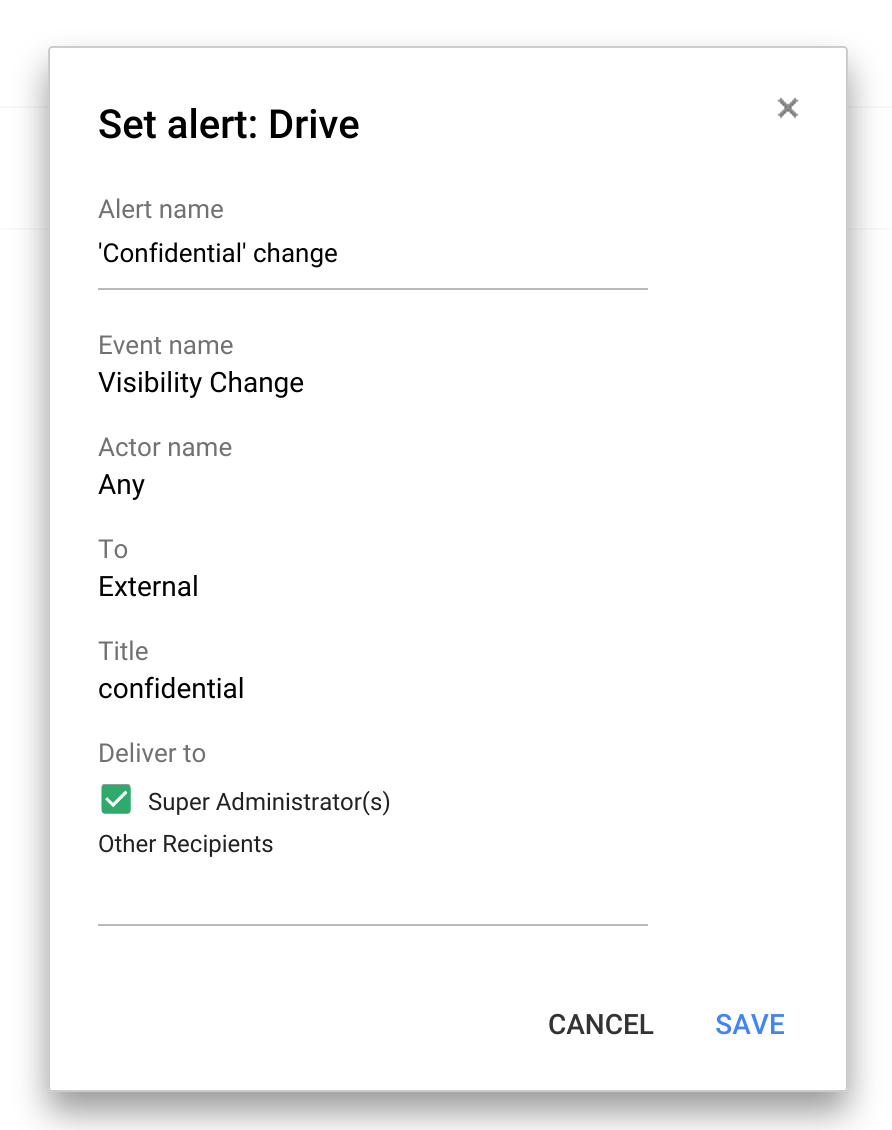
To keep track of when specific actions are taken in Drive, you can set up custom Drive alerts. So if you want to know when a file containing the word “confidential” in the title is shared outside the company, now you’ll know. And there are more events coming to Drive audit, including download, print and preview.
For all Google Apps for Work customers:
Set up custom admin alerts to find out when things change
There are lots of moving parts to running a company, and now it’s easier for IT to find out about the things they care about with custom alerts — like when a new app is installed or a shared calendar is deleted — and get those right in their inbox.

Let people reset their own passwords
Recovering passwords isn’t the most pleasant thing we do in our lives. But now IT can let employees securely reset their own passwords, so they don’t lose valuable time being locked out of their account. If this doesn’t make sense for your organization, admins can simply turn this ability off.

Available for all to use:
Disable downloading, printing and copying of any file with IRM
With Information Rights Management (“IRM”) you can disable downloading, printing and copying from the advanced sharing menu – perfect for when the file you’re sharing is only meant for a few select people. This new option is available for any file stored in Google Drive, including documents, spreadsheets and presentations created in Google Docs.

Share quickly with anyone outside your organization
When it comes to sharing, like giving final inventory lists to your caterer or last minute logos to your design agency, you want to make sure people can see it right away — whether they use Drive or not. Now, you can share with any email address and they’ll be able to view the files you share —without having to sign-in to a Google account. Admins can disable this feature for certain departments that want to require sign-in before , while enabling it for others.

All the above are rolling out over the next month.

Stay tuned for more
We’re also working on the ability to establish trusted domains, so businesses and schools that have multiple Google Apps domains or want to work with trusted partners or customers, can select multiple Google Apps domains that are OK to share with from Drive and Classroom. And on expiring access, because occasionally you only want to share files for a temporary amount of time. With expiring access you can set a future date when access will be removed. Stay tuned, theres more to come from Drive and Drive for Work.
Read More..

Friday, February 12, 2016

More pictures of HTC M7 and HTC Sense 5 0

It seems that leaked yesterday pictures of the HTC M7 were not a fake. Today we have another portion of a promising photos, this time published by androidpolice.com.

Source: www.androidpolice.com

Watermark on the screen makes those images trustworthy. Its a common watermark used by HTC in beta-software. Looking at the lock-screen I can say that HTC 5.0 is not that minor update as some have stated. I must say Im getting more and more excited about it. And this is the back of the device:

Source: www.androidpolice.com
The back of the device seems to be made from the same material as HTC One X+. Actually it looks quite the same with only flash led moved to the other side and slightly different camera body.

There are also more screenshots of HTC Sense 5.0.

Source: www.androidpolice.com

The one on the left seems to be some kind of weather app connected with initial setup screen or some social center. In the center and the right you can see more details about incoming software like HTC SDK API or kernel version. The rest is protected by HTC, which is also very common in beta-software. It looks quite promising, dont you think so?

UPDATE 24.01.2013

Here are some more screenshots taken on HTC Droid DNA device by mdeejay from xda-developers:


This looks very good! Hopefully well see new HTC UI on HTC One X/X+ as well.

Do you have any questions or comments? Feel free to share! Also, if you like this article, please use media sharing buttons (Twitter, G+, Facebook) below this post!


For latest news follow Android Revolution HD on popular social platforms:

Read More..

Thursday, March 6, 2014

More Sirius Leakage Sony’s D6503 Gets Specs Leaked and More Screenshots of the New Sony UI

IMG_20140118_152029


Over the weekend, some images of the Sony Xperia D6503 popped up on XDA. Which many of us believed it was the device that had been codenamed “Sirius” but we weren’t for sure. Now we’re seeing more screenshots of the device which shows specs, and much more.


Apparently the D6503 is indeed the Sirius device, and is coming with Qualcomm’s Snapdragon 800 processor, which is clocked at 2.3GHz. There’s also the Adreno 330 GPU inside. There’s also said to be a 5.2-inch 1080p Full HD display (likely a Triluminos display) along with a 20.7MP camera on the back and a 2.1MP shooter around front. There’s also 3GB of RAM on board. Which makes it only the second device to sport 3GB of RAM, the first being the Galaxy Note 3. As the Xperia Blog is pointing out, in the screenshots,it shows that the device has a 4.86-inch display. But that appears to not be counting the on-screen navigation at the bottom. Which altogether should still be 5.2-inches.


1-315x560


You’ll notice that the build on this device is from Android 4.3. But again, according to the Xperia Blog, this is an old build and that there is a new firmware version 17.1.A.X.XXX which is Android 4.4.2 KitKat So it looks like we will indeed be seeing Android 4.4.2 launch on this device which is a great thing. Especially since KitKat updates have been going out pretty quickly lately. There are also plenty of changes to the UI, which I’m guessing we’ll see make their way to other Sony devices when they get the Android 4.4 update. Which you can see in the screenshots down below.


This is looking more and more like the Xperia Z2, with a 5.2-inch Full HD display, Snapdragon 800, and more, are you likely to pick this one up when it’s announced? Let us know in the comments below.


Source: XperiaBlog, XDA


D6503-New-UI_2-AH-15 D6503-New-UI_2-AH-14 D6503-New-UI_2-AH-13 D6503-New-UI_2-AH-12 D6503-New-UI_2-AH-11 D6503-New-UI_2-AH-10 D6503-New-UI_2-AH-9 D6503-New-UI_2-AH-8 D6503-New-UI_2-AH-7 D6503-New-UI_2-AH-1 D6503-New-UI_2-AH-2 D6503-New-UI_2-AH-3 D6503-New-UI_2-AH-4 D6503-New-UI_2-AH-5 D6503-New-UI_2-AH-6

The post More Sirius Leakage: Sony’s D6503 Gets Specs Leaked and More Screenshots of the New Sony UI appeared first on AndroidHeadlines.com |.


via AndroidHeadlines.com | http://ift.tt/1ig8mi4
Read More..