Pages

Showing posts with label sense. Show all posts

Thursday, May 19, 2016

KitKat for HTC One Google Edition is out Sense version coming soon!


Android "four point four" (aka KitKat) is what most HTC One users are still eagerly waiting for. The "senseless" version is already available to download via Over The Air (OTA) update on the HTC One Google Play Edition.

If you havent received the update yet, or you dont have a Google Play Edition variant of the HTC One, you can still have a taste of the fresh Google goody. Just navigate to my HTC One Google Play Edition thread on the xda-developers forum and download Android Revolution HD based on Android 4.4 KitKat for the HTC One.

What weve already learned so far is that youll probably need an S-OFF device in order to properly boot KitKat custom ROM. Its a weird issue we still investigate and we hope to come up with some more convenient solution soon!

Also some good news for HTC Sense fans - Android 4.4 with HTC Sense 5.5 on board will be available very soon! Dont be upset its still Sense 5.5 instead of Sense 6.0. New update will bring a lot of bugs fixes and all the goodies Android 4.4 comes with. Stay tuned!

Have any questions or comments? Feel free to share! Also, if you like this article, please use media sharing buttons (Twitter, G+, Facebook) below this post!
Read More..

Friday, May 6, 2016

Stock system dumps Android 4 3 with official HTC Sense 5 5 for HTC One


First official update with brand new HTC Sense 5.5 for the HTC One arrived today. The new software number is 3.62.401.1 and its based on Android 4.3. To receive the OTA update your device must be running 2.24.401.8 software and you must own the international version of HTC One (M7_UL). If there is no update for you CID yet, you can download and flash stock system dump instead.

HTC One thread - HTC One *STOCK* ROM | 3.62.401.1 | Jelly Bean | HTC Sense 5.5

Download links can be found on this blog, under Downloads section - Downloads

The official list of changes from the OTA update:
  • System Improvements
    - Android 4.3 and HTC Sense 5.5 update
  • Video Highlights improvements
    - Updated interface
    - Add soundtracks to videos
  • BlinkFeed improvements
    - Access recommended news from your social network
    - Additional global news sources
    - Save articles to read later or offline
    - Create custom feeds from news media, Twitter and YouTube
  • Music improvements
    - Updated interface
    - Embedded music channel with new scenes
  • Sense TV improvements
    - Updated interface
    - Add MY Picks Page to improve program management
Have any questions or comments? Feel free to share! Also, if you like this article, please use media sharing buttons (Twitter, G+, Facebook) below this post!
Read More..

Wednesday, April 27, 2016

HTC One Android 4 2 2 with HTC Sense 5 1 aka HTC Sense 5 0


There were quite a lot of rumours about upcoming HTC Sense and Android 4.2.2 update for HTC One and HTC Butterfly. All were expecting HTC Sense 5.1 to show up, but instead, the version of HTC UI in latest Android 4.2.2 update is still 5.0. However, it does have a lot of important changes. Let me introduce few of them.
1. % battery icon


Finally! The most popular modification in custom ROMs of all kind. Now you can enable it under Settings ---> Power ---> Show battery level.


2. Android EQS


HTC did a great job by incorporating Android native EQS. You can switch it by tapping on the EQS icon in the upper right corner of the notification menu.


3. Android Daydream

Another Android 4.2.2 feature included in latest HTC update.


4. Long press home button works as menu button.

Its been very popular modification in HTC One custom ROMs. Now its by default added to Android 4.2.2 update as well.


5. Minor changes in the app drawer and dock

Now you can remove all the icons from the dock, which wasnt possible in HTC Sense 5.0 we had in Android 4.1.2. Also, after moving some particular icon to the dock, it wont be gone from the app drawer.


6. More new screenshots coming soon!
Read More..

HTC Sense 7 0 Sense Home with Smart Folders

HTC "Sense Home" system is one of the greatest HTC Sense 7.0 feature I found so far. Its basically a widget where you can place apps and games icons from your app drawer or even create a new typical folder. "Sense Home" widget is connected with locations service and it automatically detects the location of your device, changing in a real time the content of the widget to "Home", "Work" or "Out". Want to know more? Keep reading!

To activate "Sense Home" you need to either long press on the screen of the device and choose "Add apps and widgets" or navigate to Settings / Personalize / Add apps and widgets. Once done you will see the first widget on the list called "Sense Home". And this is what we are looking for.


Now just drag & drop it like with any other Android widget on the empty space of the screen. The minimum size of the widget is 4x2 but it can be resized to 4x3 or even 4x4. So basically you can fill your entire screen with the Sense Home widget if its how you like to organize your apps and games on the screen.

Sense Home

The "Sense Home" widget has 3 main categories - "Out", "Home" and "Work". You can choose between them by pressing the corresponding icon on the top left side of the widget. In each location - Home, Work or Out you can place up to 16 icons or 16 folders (depending if you choose a 4x2, 4x3 or 4x4 widget size). Each folder can store up to 16 icons.


Precise location

Of course it wouldnt be very handy if you have to choose manually between these 3 work-spaces. To help you with that HTC paired the "Sense Home" widget with a location service. Once you set up the Home and Work locations, the content of the "Sense Home" widget will change automatically.


Smart Folders

In the "Sense Home" widget you can place 2 "Smart Folders" - Downloads and Suggestions. Downloads folder will contain all apps and games you downloaded from the Google Play and Suggestions folder will store suggestions for nearby restaurants, apps, websites, games, news and other kind of personalized stuff, based on your usage data. 


If you dont want to use Smart Folders you can easily disable them by pressing 3 dots menu in the top right corner of the "Sense Home" widget.


Additionally, you can also disable sharing precise location or personal usage data. That depends on how much you care about your privacy.


Pin & Unpin

Additionally there is a Pin and Unpin option and you can use it on ever icon inside the widget or a created folder. The process is very simple, just long press on the element and wait until its pinned or unpinned.


Personally, I find this new "Sense Home" very interesting and unique. I am sure that HTC will extend its features in time, adding more categories or even lettings users create their own ones.

If by any chance you havent yet read previous HTC Sense 7.0 related articles heres a short reminder:

  • HTC Sense 7.0 - Wallpapers
  • HTC Sense 7.0 - Custom Navigation Bar
  • HTC Sense 7.0 - Themes Generator

Do you have any questions or comments? Feel free to share! Also, if you like this article, please use media sharing buttons (Twitter, G+, Facebook) below this post!


For latest news follow Android Revolution HD on popular social platforms:

Read More..

Tuesday, April 19, 2016

HTC One with KitKat and HTC Sense 5 5 is finally out!


Android 4.4 KitKat with HTC Sense 5.5 is now available for the HTC One. This is a must-have update for all HTC One owners.

Sounds great? Well, you might not be happy after all. So far the update is available only for the owners of the Developer Edition of the HTC One. But there is a good news too - you can have KitKat update on your "regular" HTC One too, without waiting for the official update (which might take few more weeks).

To make it possible, Android Revolution HD has been updated to 40.x series, based on the official Android 4.4 KitKat & HTC Sense 5.5 update (4.06.1540.2). 

Why KitKat update is that important? It has several very important changes:
  1. Vastly improved security
  2. Smarter "Location" settings
  3. Better performance
  4. Improved battery consumption
  5. Faster multitasking
  6. Better Google Hangouts integration
  7. ...and much more!
Here are some screenshots. You can see the new Location settings panel.


Users feedback so far leaves no doubts - this update brings significant performance improvements. Some users are even reporting, that Android 4.4 with HTC Sense 5.5 gives better performance experience than pure KitKat update for the HTC One Google Edition which we wrote about here. I think this is enough said. Dont stay on your old 4.3 OS and grab newest 4.4 update as soon as possible!

Link to the original XDA-developer thread
Link to the download page

Have any questions or comments? Feel free to share! Also, if you like this article, please use media sharing buttons (Twitter, G+, Facebook) below this post!
Read More..

Monday, March 28, 2016

Sense 6 Toolbox for HTC One HTC One M8


Happy day for all users who love to customize their HTC Sense UI! Sense 6 Toolbox (previously Sense 5 Toolbox) is known to be the best and the most advanced tool to customize your Sense 5/6 based device. It’s based on Xposed eco-system and it allows you to change a lot of settings of the user interface, including colour schemes and different layout styles.

More details can be found here ---> Sense 6 Toolbox with Android Revolution HD

Want to see some goodies it offers? Just take a look!


Some of the features you can find in Sense 6 Toolbox:

Interface mods
·         Transparent statusbar and notification drawer
·         Center clock, AM/PM removal, traffic meter, horizontal EQS
·         Gestures to manipulate recent apps and additional information about each app, AOSP styled recents
·         [Sense 6] Custom color themes for every app

Statusbar mods
·         Icons by vomer (CleanBeam)
·         Customizable color themes for all new statusbar icons
·         Ability to hide icons

Sense mods
·         Transparency for many UI elements (dock, clock widget, app drawer, folders, etc)
·         Infinite apps in folders, 7 home screens, home popup menu, more grid options for homescreens and app drawer
·         Actions for vertical swipes and shaking on homescreens, horizontal swipes on dock

Messaging mods
·         Wake on SMS, increase MMS size
·         Replace delivery notifications with toasts
·         Increase MMS size

Controls mods
·         Volume2wake
·         Activate flashlight on power long press
·         Bind actions to hardware buttons (Back long press and swipe up from Home)
·         Bind actions to volume keys for camera and music playback controls
·         [M8] Smaller softkey bar

Various mods
·         Advanced Power Menu
·         Show more information about installed apps and apps that are being installed
·         Improved screen locking and unlocking
·         Hardware buttons backlight control
·         Large caller photo in dialer and on lockscreen during calls
·         Disable unwanted notifications and confirmation dialogs
·         On/off screen animations (Fade, CRT)

Full list of the features can be found here - complete mods list.

Sense 6 Toolbox is tested and fully compatible with Android Revolution HD 5.0 for the HTC One M8 you can download from this xda-developers thread.

Official Sense Toolbox homepage

Have any questions or comments? Feel free to share! Also, if you like this article, please use media sharing buttons (Twitter, G+, Facebook) below this post!


For latest news follow Android Revolution HD on popular social platforms:

Read More..

Thursday, March 24, 2016

How to Enable Harman Kardon sound effect of the HTC One M8

Just few days ago HTC announced the new HTC One (M8) Harman & Kardon Edition. The HTC One (M8) Harman & Kardon edition has been designed for consumers who appreciate high-quality audio and want the best smartphone on the market without compromise. It’s a special edition of the critically acclaimed HTC One (M8) that builds upon the iconic all-metal design in a new brushed black finish with champagne accents, and is another example of HTC’s commitment to offer the best audio experience on a smartphone.

Today we present you how to enjoy this revolutionary audio experience on your “regular” HTC One (M8).

First of all it seems that the changes between the regular M8 and the M8 H&K Edition are only or mainly software related. We believe that the sound processor is the same in both units, however the firmware of that sound processor is probably different. To such conclusion led us the particular part of the M8 Sprint firmware.zip package called adsp.img (Advanced Digital Sound Processor) which is usually the same between each device variants and stays the same since the first device software release date, but in this case it was different. We found out that the adsp.img from the Sprint HTC One M8 was different to the others One M8 variants so its probably needed for a proper H&K sound mod function.

The rest of the changes are located on /system partition:
  • system/customize/ACC/default.xml
<item type="boolean" name="support_harman">false</item> has to be changed to
<item type="boolean" name="support_harman">true</item> to make the OS "think" that youre actually using the H&K M8 Edition. This boolean item wasnt present in the early HTC One M8 1.24.401.4 software version.
  • system/etc/tfa/playbackHM.* / playbackHM_l.* files which are mostly related to the equalizer settings
  • system/etc/audio_policy.conf tuned for higher sampling_rate values (up to 192000)
  • system/lib and system/lib/hw libraries, mostly related to the part of the SoC responsible for the audio
This all might sound a little bit complicated, but in fact it was just an explanation about the changes that are required software-wise to enable the H&K support on the regular HTC One M8.

The tricky part is that to flash adsp.img on international version of the HTC One M8 youll need to have Security OFF (S-OFF) device. Without S-OFF you can only update files located on the system partition on your device. Below you can find proper ZIP packages that are suppose to be flashed using custom recovery. First one (for S-OFF devices) together with system partition will also update the adsp.img. The other one (for S-ON devices) will update only system files, however you might not notice any sound improvements without the adsp.img.

Download links:

Harman & Kardon sound mod for the HTC One M8 S-OFF
Harman & Kardon sound mod for the HTC One M8 S-ON

Thanks to baadnewz for brining the initial version of the modification.

Do you have any questions or comments? Feel free to share! Also, if you like this article, please use media sharing buttons (Twitter, G+, Facebook) below this post!


For latest news follow Android Revolution HD on popular social platforms:

Read More..

Wednesday, March 9, 2016

HTC Sense 7 0 Internet Browser


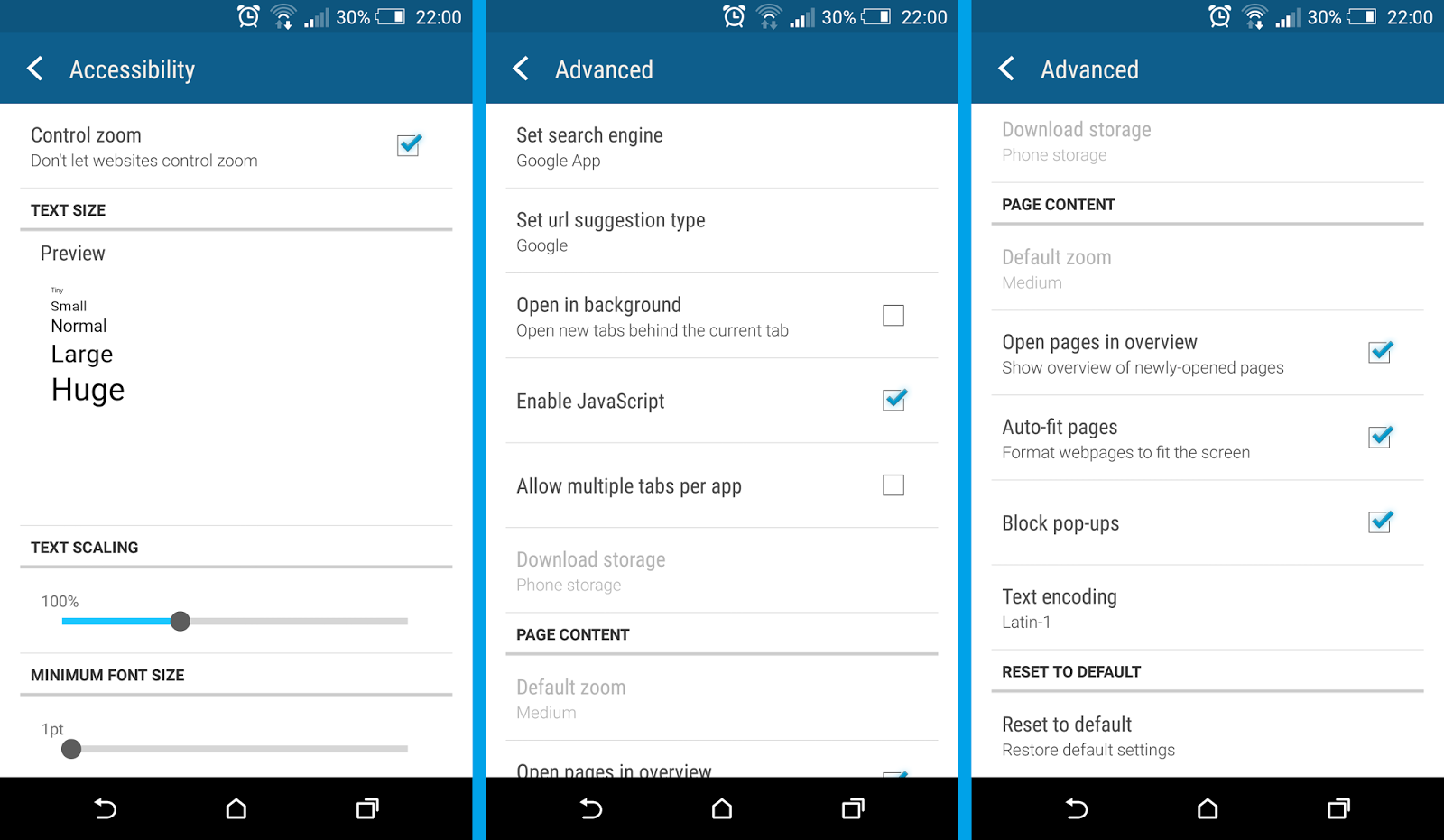
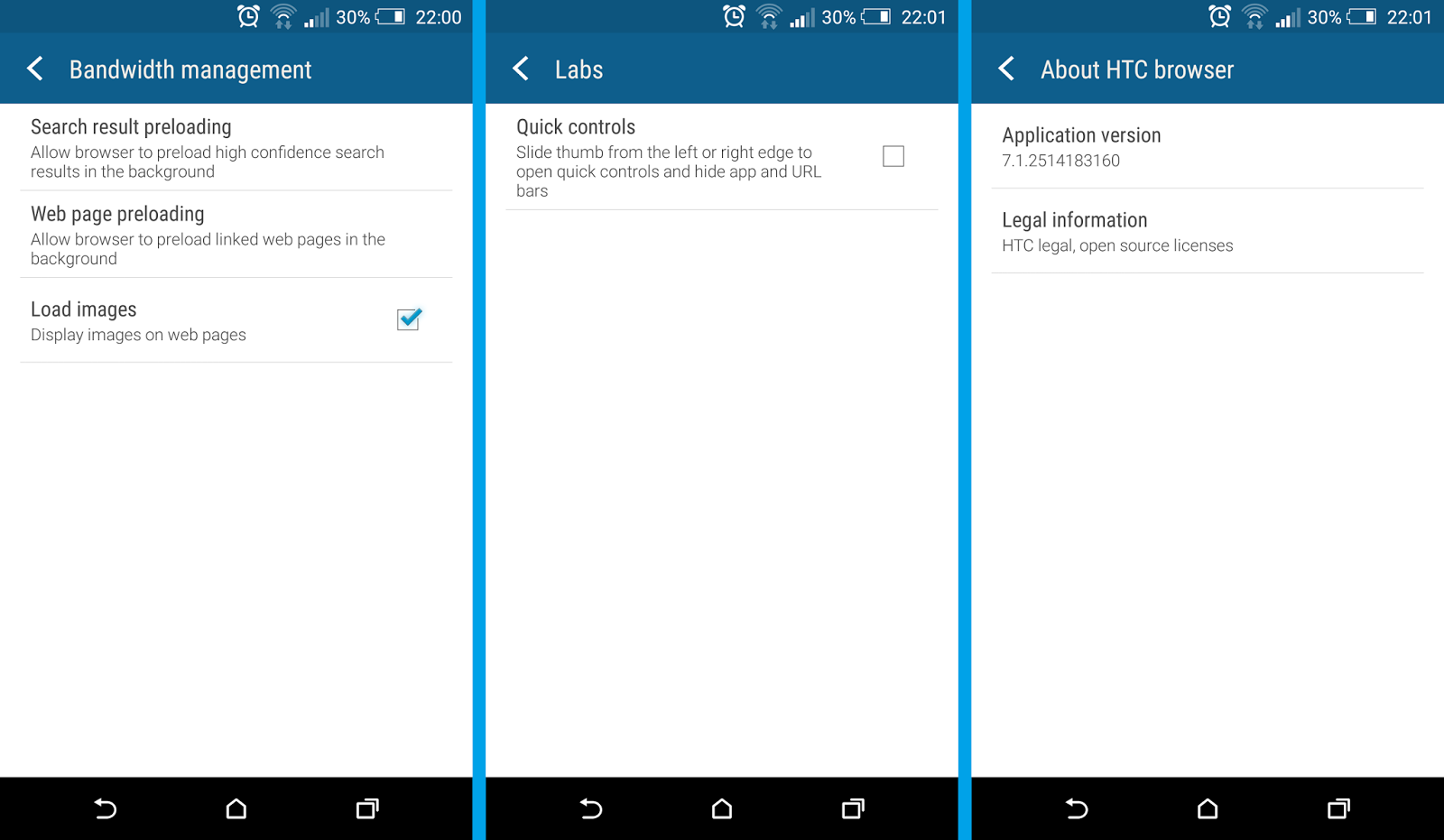
HTC has just started rolling out the new HTC Internet app update. Newest version is tagged as 7.1.2514183160 and it brings some Material Design touches. This HTC Internet browser is a part of the HTC Sense 7.0 interface. Lets take a look at some of the HTC Internet app features, but keep in mind that most of them were already available in the older version of the browser. The new HTC Internet is mostly about new design.

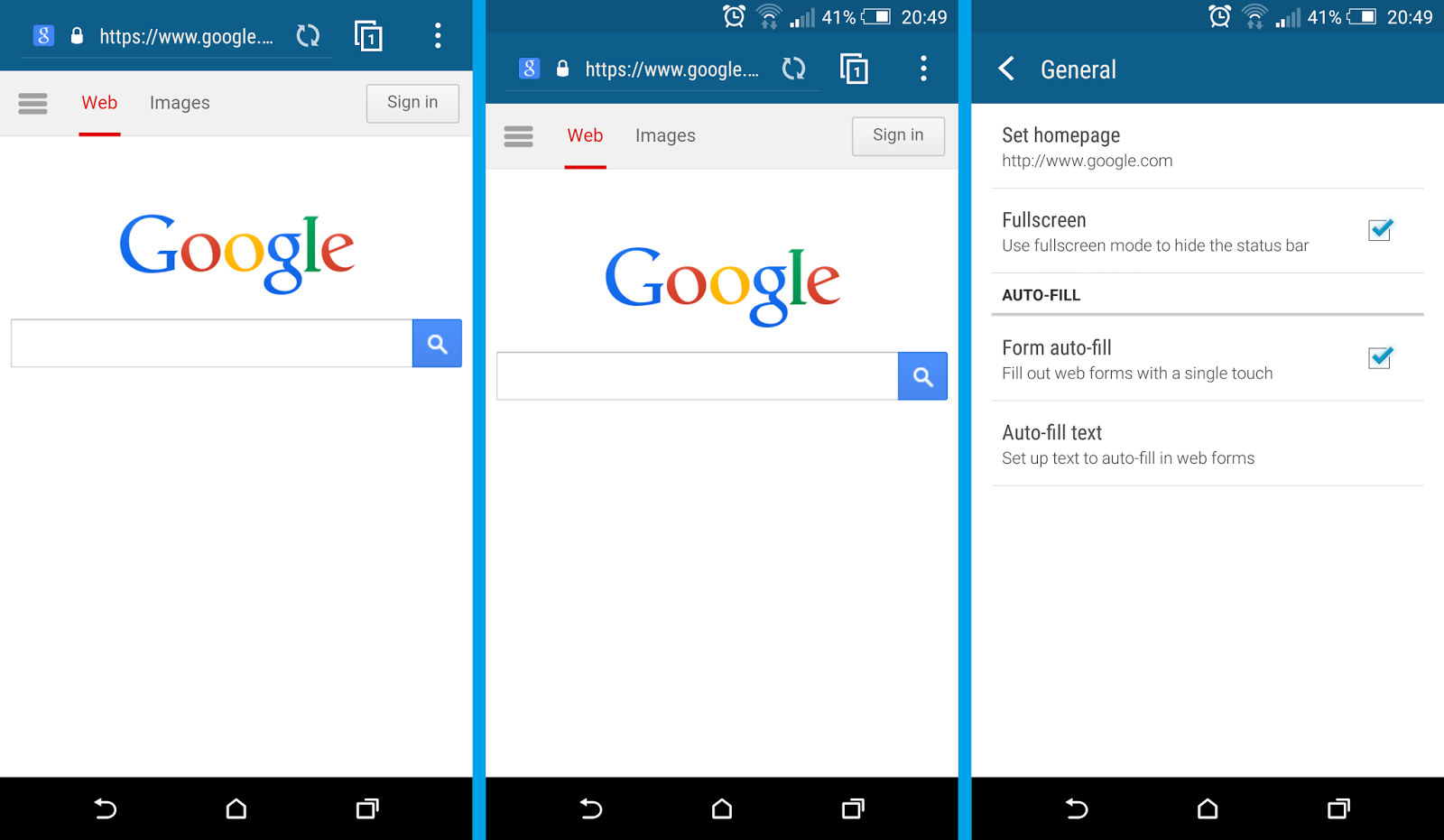
View mode

Within few clicks you can choose if you want to browse the Internet with the status bar on the top of the browser, or in the "fullscreen" mode with the status bar hidden. The status bar wont show up until you swipe down from the top of the screen. However, it will not appear and stay like in the regular mode, but it will cover up the URL bar (immersive mode).


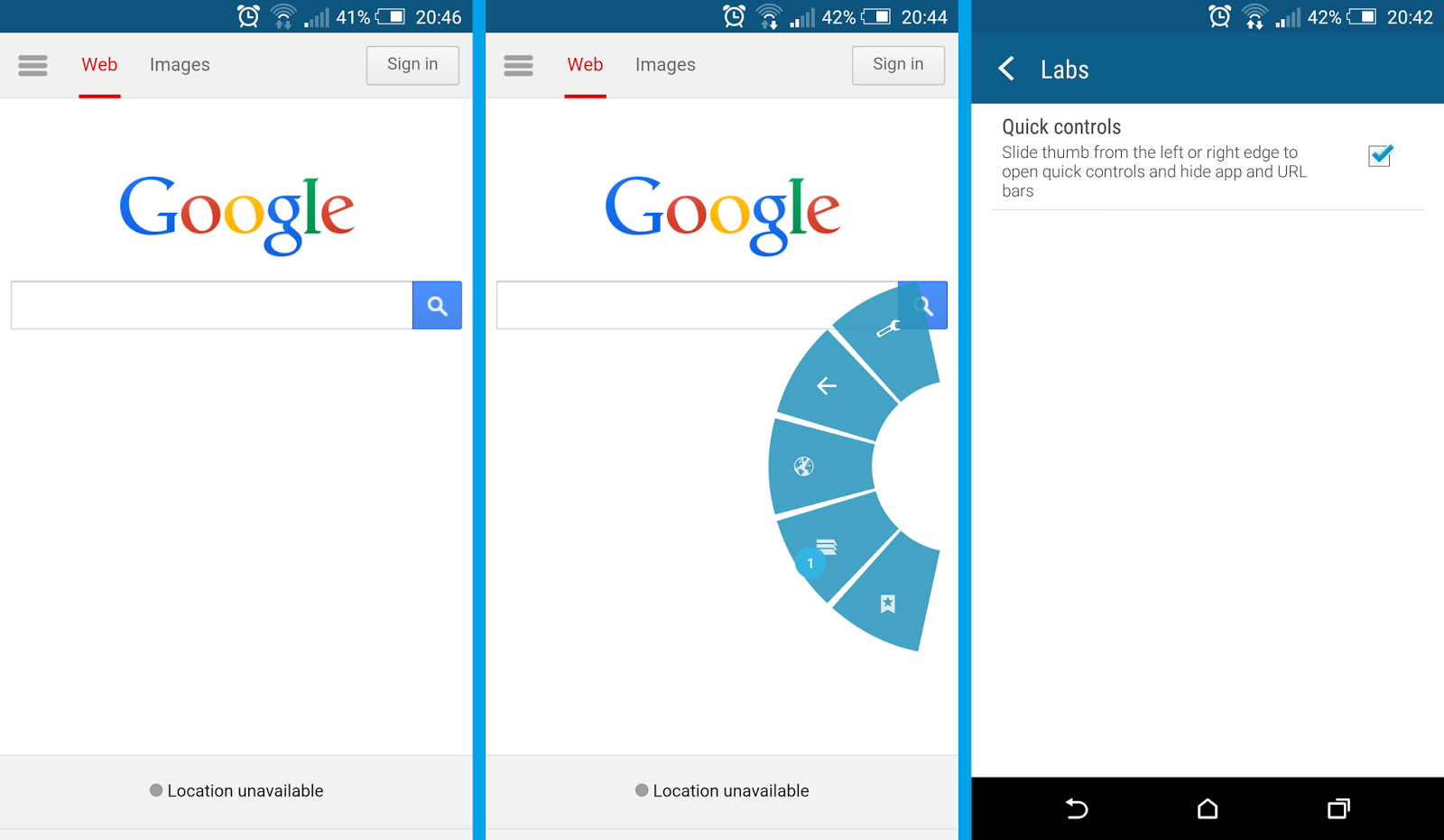
Quick Controls

With Quick Controls the URL and 3 dots bar are gone. Anything you want to do (go back or forward, enter Settings, bookmark page etc.) you need to slide with your thumb from the left or right edge of the screen to open quick controls. Pretty hard to learn at start because its very easy to slide over wrong option, but Im sure its possible to master it after short time of use.


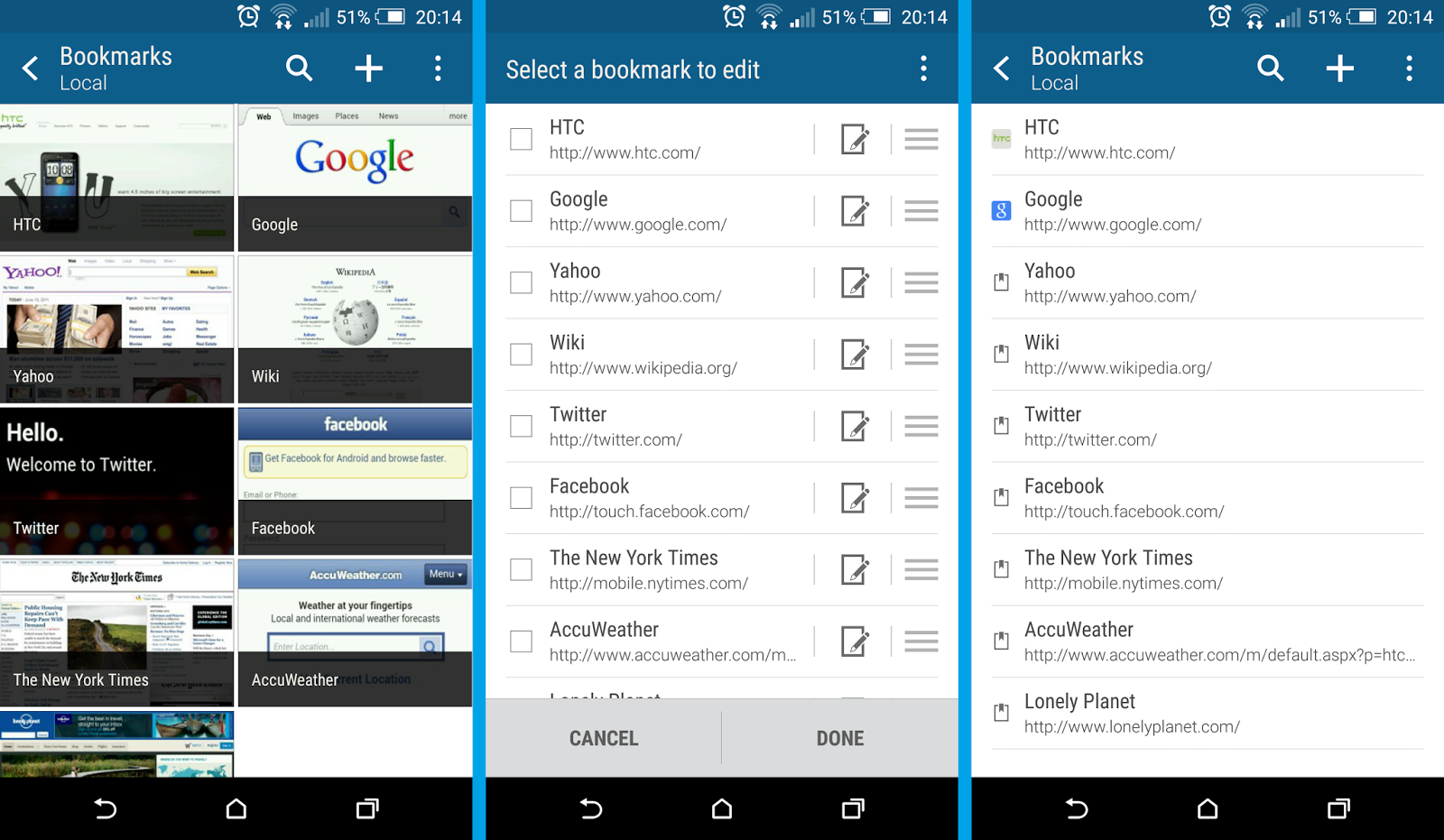
Bookmarks

Well known place, where you can manage bookmarked pages. You can choose the view mode between "Thumbnails" (first screen) and "List" (third screen). By editing bookmarks you can also change the order on the list, change the bookmarks labels and addresses or add particular bookmark to the created custom folder.


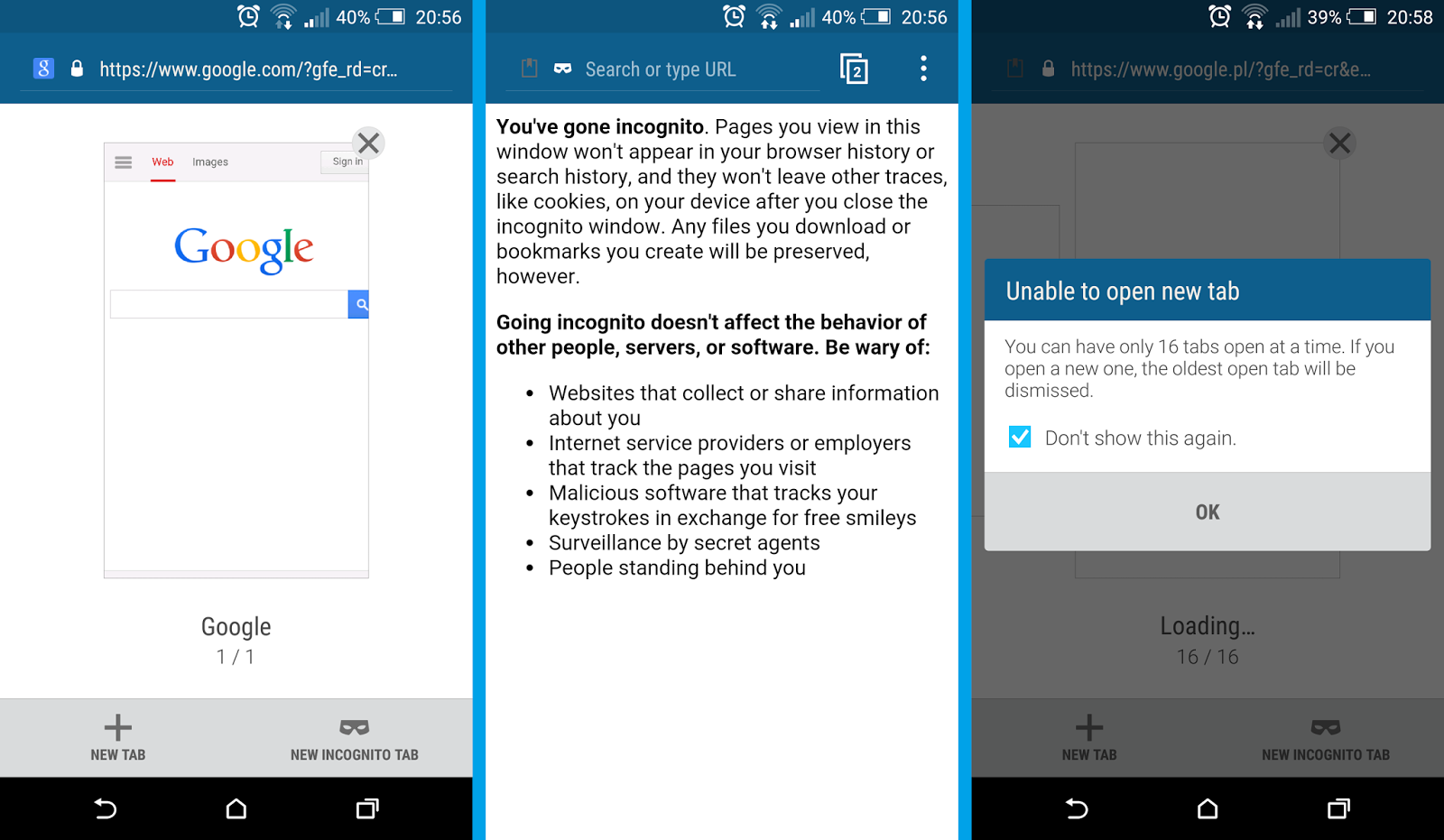
Tabs and Incognito Mode

HTC Internet app allows you to work with multiple tabs - either regular ones or "Incognito Tab" The incognito mode drastically increases your privacy level because the site you view in that mode wont appear in the browser or search history, and it wont leave other traces (like cookies) on your device. You can have maximum up to 16 tabs open at the same time.


Menu

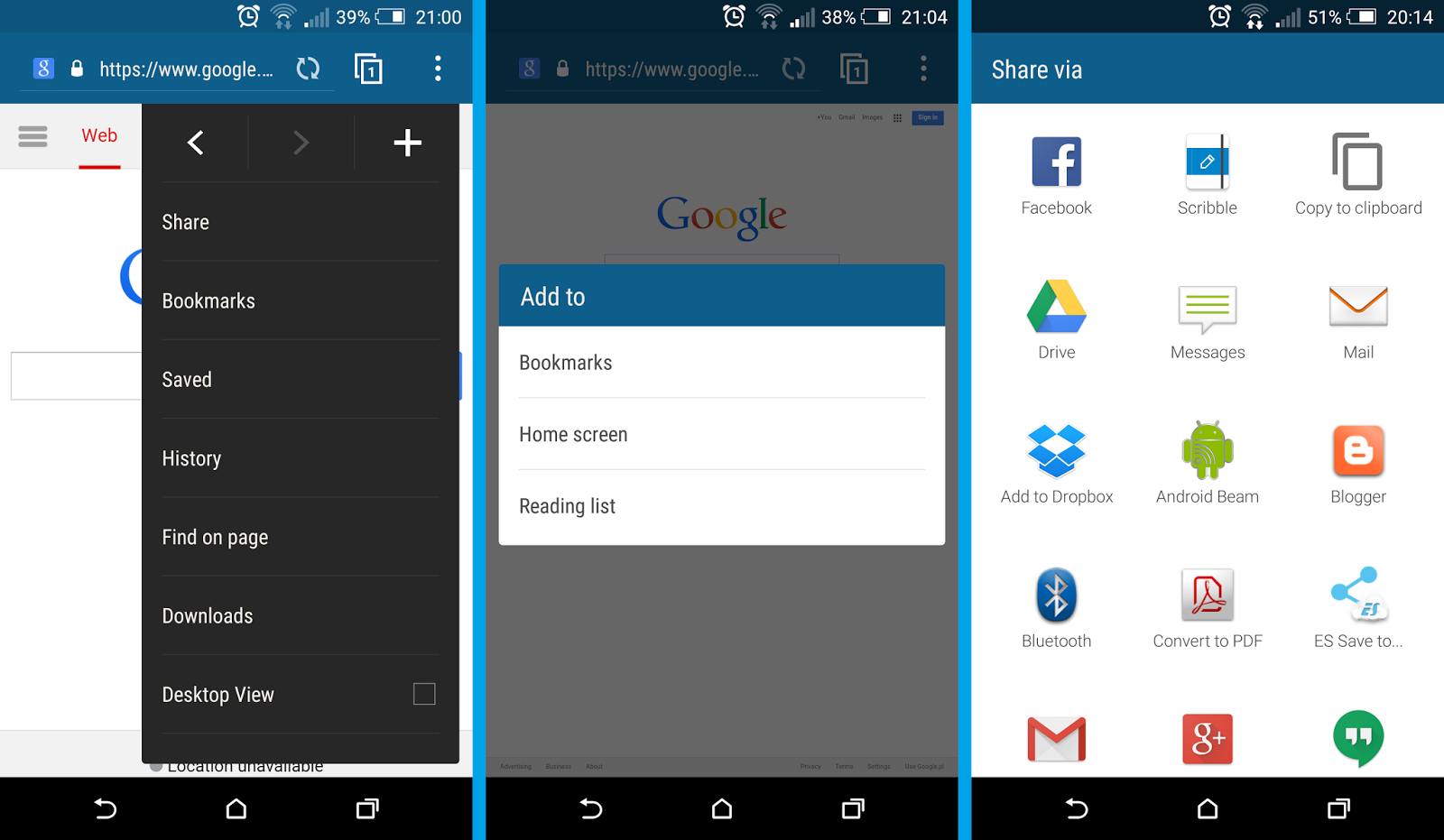
The 3 dots menu offers some typical features like "Go back" and "Go forward" arrows or "Add to" button, which you can use to create new bookmark, add certain site to the home screen or Reading List. With the "Share" option you can share current site via different social channels, Dropbox, bluetooth, mail and more.


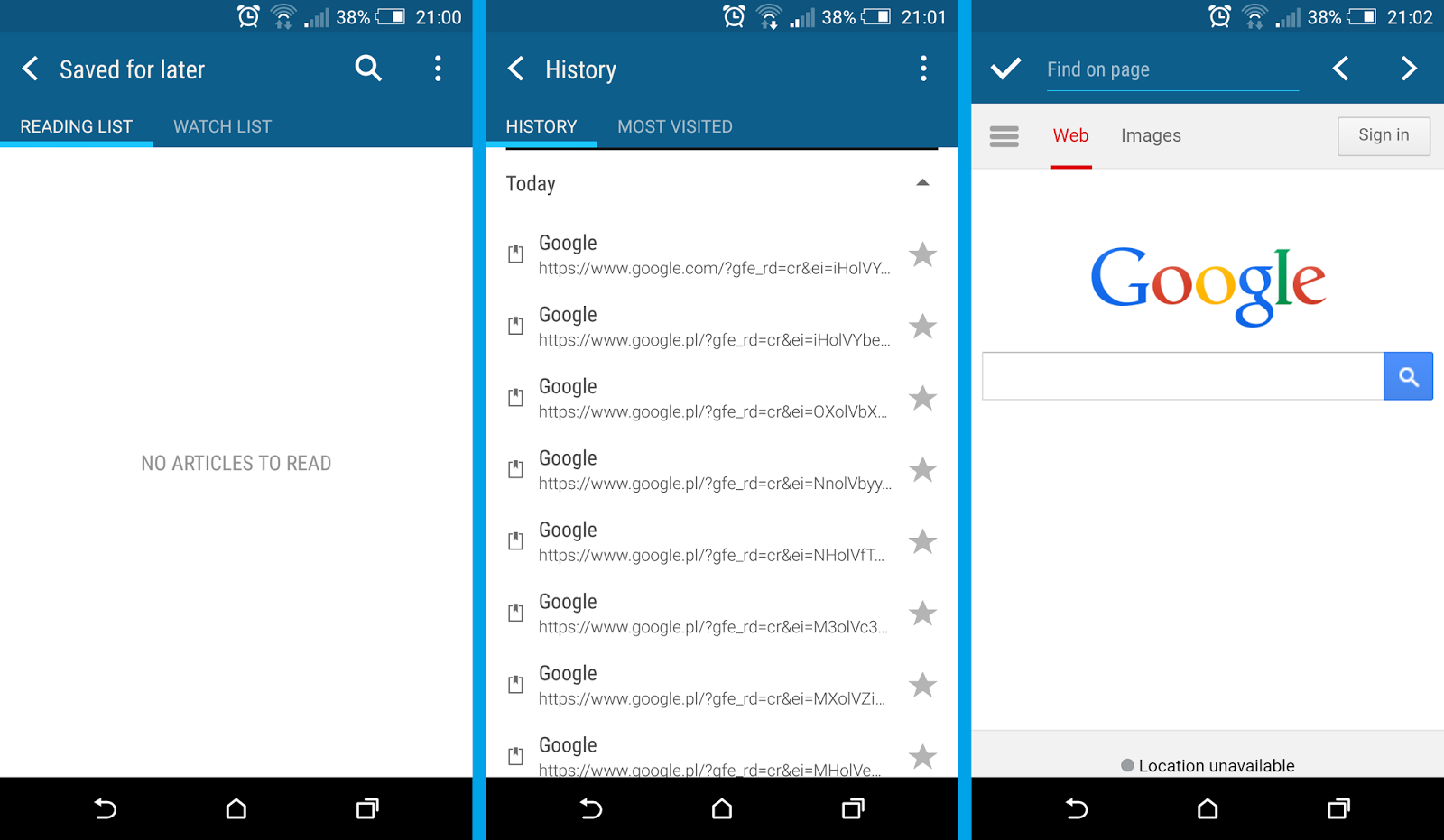
With the "Saved" option you can view a list of sites you decided to read later (Reading List) or videos you decided to watch later (Watch List). To add a site to the Reading List click on the 3 dots menu ---> + (plus) icon ---> Reading list.

"History" and "Find on page" options dont need to be explained.


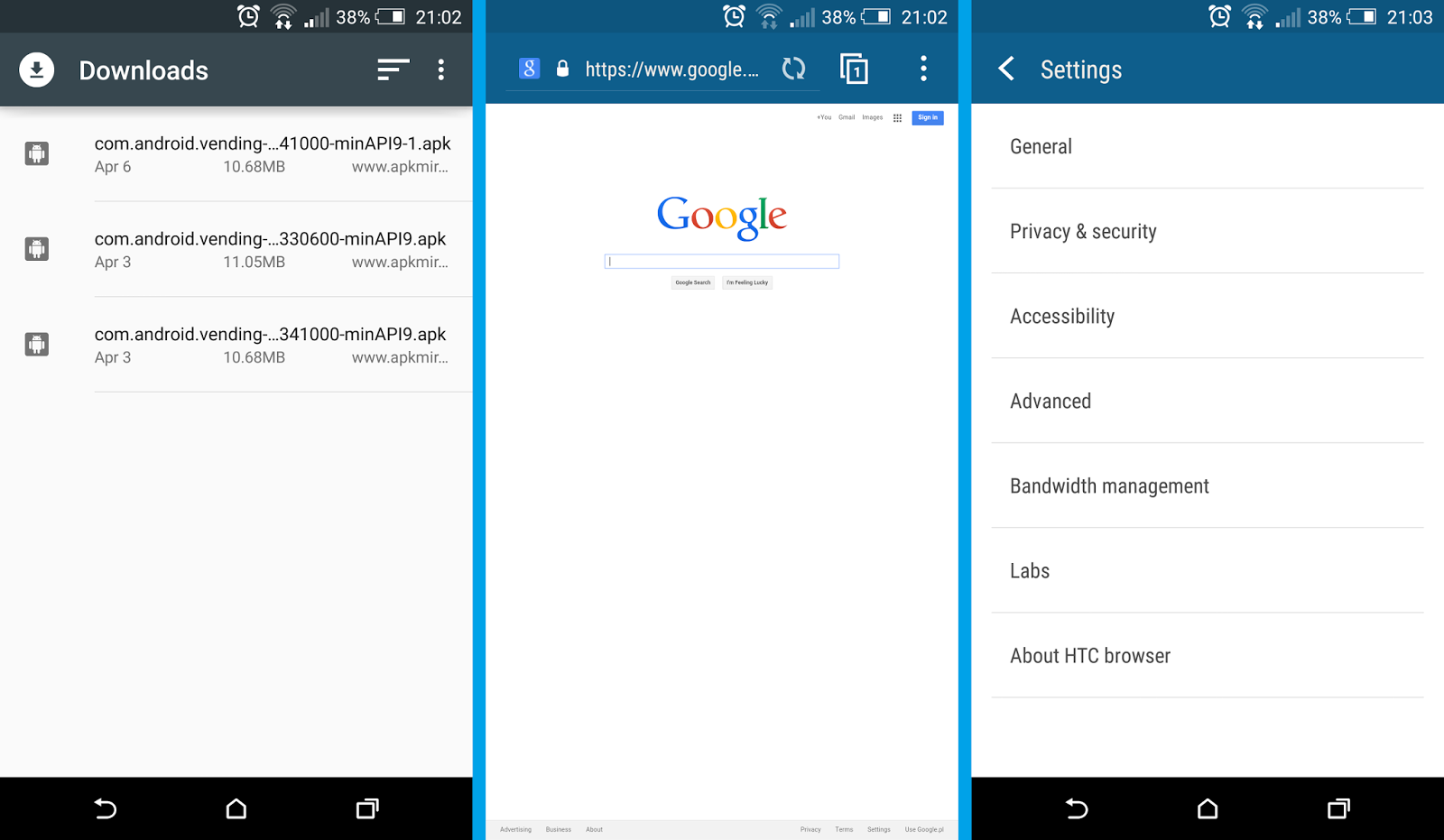
The "Downloads" takes you to the HTC Downloads app, where you can see all downloaded files, not only via the HTC Internet app. You can also choose to view certain pages in the "Desktop View" mode. The last position on the 3 dots menu is Settings.


Settings

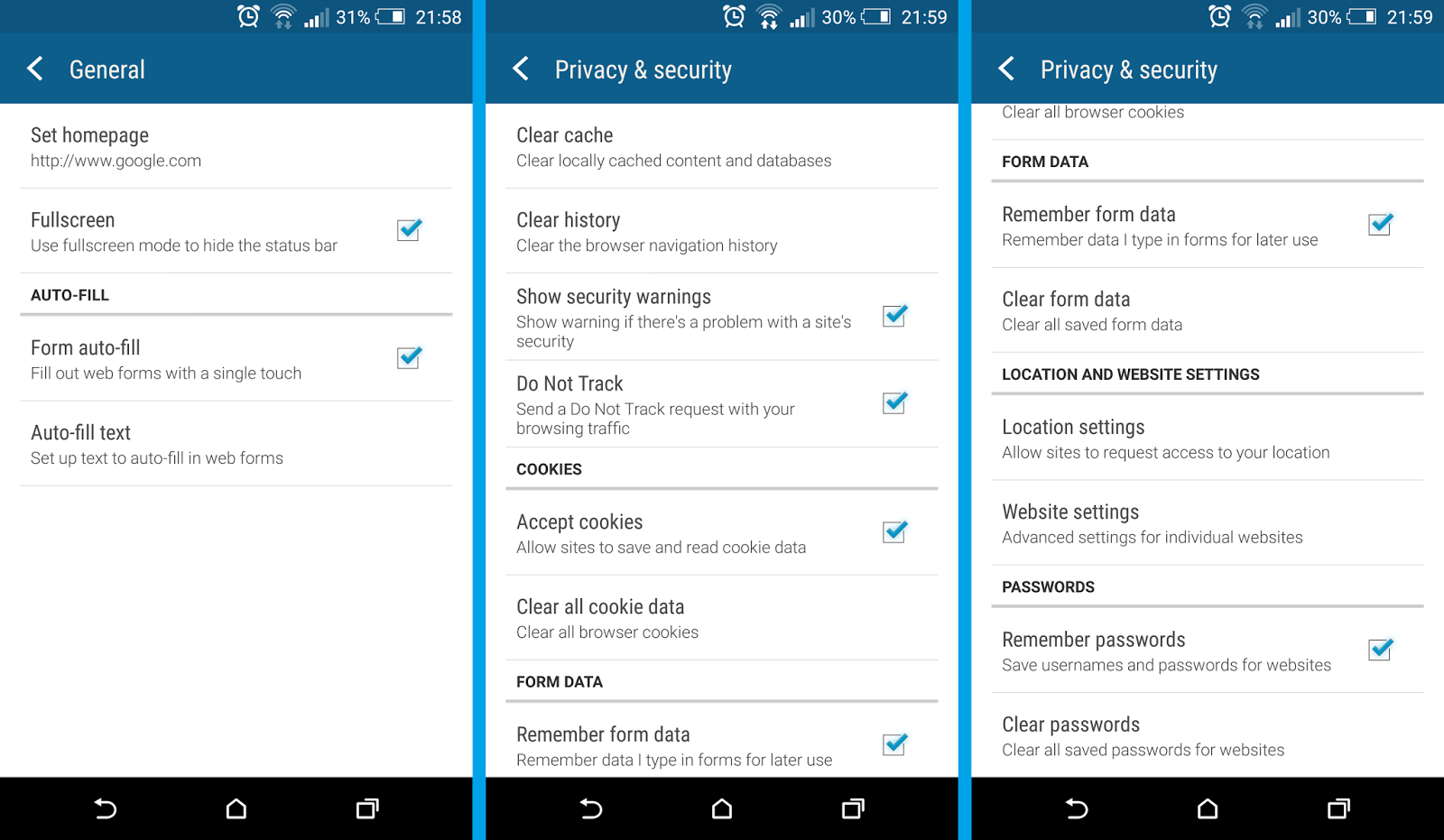
Here you can adjust various privacy and security settings (such as cache, history, cookies, passwords and more), as well as accessibility options (text size, scaling and zoom), advanced settings (search engine, JavaScript, pop-ups), bandwidth management and Labs, where you can enable Quick controls.


Conclusion

The new, re-designed HTC Internet app matches the new HTC Sense 7.0 UI style as well as it looks a bit more "materialized" now. Can it compete with the Google Chrome browser? No, but I dont think it is suppose to. It is just a solid, stock browser with a common features browsers on the market have. It looks good and works as it should.

The HTC Internet app is available in the Google Play.

Do you have any questions or comments? Feel free to share! Also, if you like this article, please use media sharing buttons (Twitter, G+, Facebook) below this post!


For latest news follow Android Revolution HD on popular social platforms:

Read More..

Tuesday, March 8, 2016

HTC One X with Android 4 2 2 HTC Sense 5 0 update

HTC One X is one of the very few (if not the only one) devices from HTC which reached 4.xx.xxx.x software version (4.18.491.2). This only proves how great this device still is and how many users are still actively using it. Today HTC One X users are receiving one of the most important update - Android 4.2.2 with HTC Sense 5.0. Last summer HTC did similar update, upgrading HTC One X with Android 4.1.1 from Android 4.0.4 and bumping HTC Sense from 4.0 to so called "4+". However, HTC Sense 4.0/4+ update wasnt that significant and didnt bring so many new features and improvements as HTC Sense 5.0.


The new update includes well known HTC BlinkFeed™ (available firstly only on HTC One), native Android Quick Settings and completely re-designed HTC Sense interface. Two features are missing from HTC One - HTC BoomSound™ and HTC Zoe™. Unfortunately, both are hardware related. BoomSound™ obviously needs dual speakers audio system, and HTC Zoe™ was created to work with small pictures taken with UltraPixel camera - which allows user to take excellent pictures in natural conditions using only 4 mega pixels resolution in pair with dedicated HTC ImageChip™ 2.


As you can see, there is a changelog attached to the OTA notification, however it is just a "commercial" changelog - that means there are a lot of different changes/improvements under the hood. Android 4.2.2 update brought a lot of changes itself, not to mention new HTC Sense 5.0 features, further optimization in SoC drivers and kernel related improvements.


The new update for HTC One X looks great and surely will bring some fresh air to the device. HTC One X+ already received HTC Sense 5.0 update few days ago, however it was only Taiwanese update so far. Below you can see HTC BlinkFeed screen together with Android Quick Settings on latest HTC One X 4.18.401.2 software.


Have any questions or comments? Feel free to share! Also, if you like this article, please use media sharing buttons (Twitter, G+, Facebook) down this post!
Read More..